AI search · ChatGPT · Business listings
Can you finally see when ChatGPT recommends your business? For the first time, yes, at least partly. OpenAI has launched ChatGPT Business Hub, a new space inside ChatGPT where a business can claim its listing, verify that it's the real owner, update its details and see how often ChatGPT mentions it and sends people to its website.
Think of it as ChatGPT's answer to a Google Business Profile. Below, we explain what it is, walk through setup and verification, and show what its insights can (and can't) tell you.
The short version: Business Hub is in beta. Claiming is open to eligible businesses in places where ChatGPT is available, but verification has two layers, some features are US-only, and the reporting only shows up once your business has enough activity. It's worth claiming now, while expectations are realistic.
What is ChatGPT Business Hub?
On November 10, 2026, OpenAI introduced Businesses in ChatGPT as a beta program. Business Hub is the dashboard at the center of it. Through Business Hub, a company can:
- Claim its business in ChatGPT and prove it's authorized to manage it
- Keep its information current, such as its website, description, category, logo, delivery policy and return policy
- Add a product feed with prices and availability, if it sells products
- See insights about how often ChatGPT mentions the business and how many people click through to its website
- Build a Business Agent, a branded chat assistant that answers customer questions (eligible US businesses only)
OpenAI lists no fee for claiming, and you don't need an ads account or a ChatGPT Enterprise agreement to do it. One naming tip so you don't get confused: ChatGPT Business is OpenAI's paid workplace subscription for teams. Businesses in ChatGPT and Business Hub are this new listings program. They are different products.
Why this matters for your marketing
ChatGPT is now one of the largest places people go to research purchases. OpenAI says 1.2 billion people use ChatGPT each week. When those people ask for a recommendation, ChatGPT may show businesses in its answer, and they can tap a business to open its ChatGPT profile.
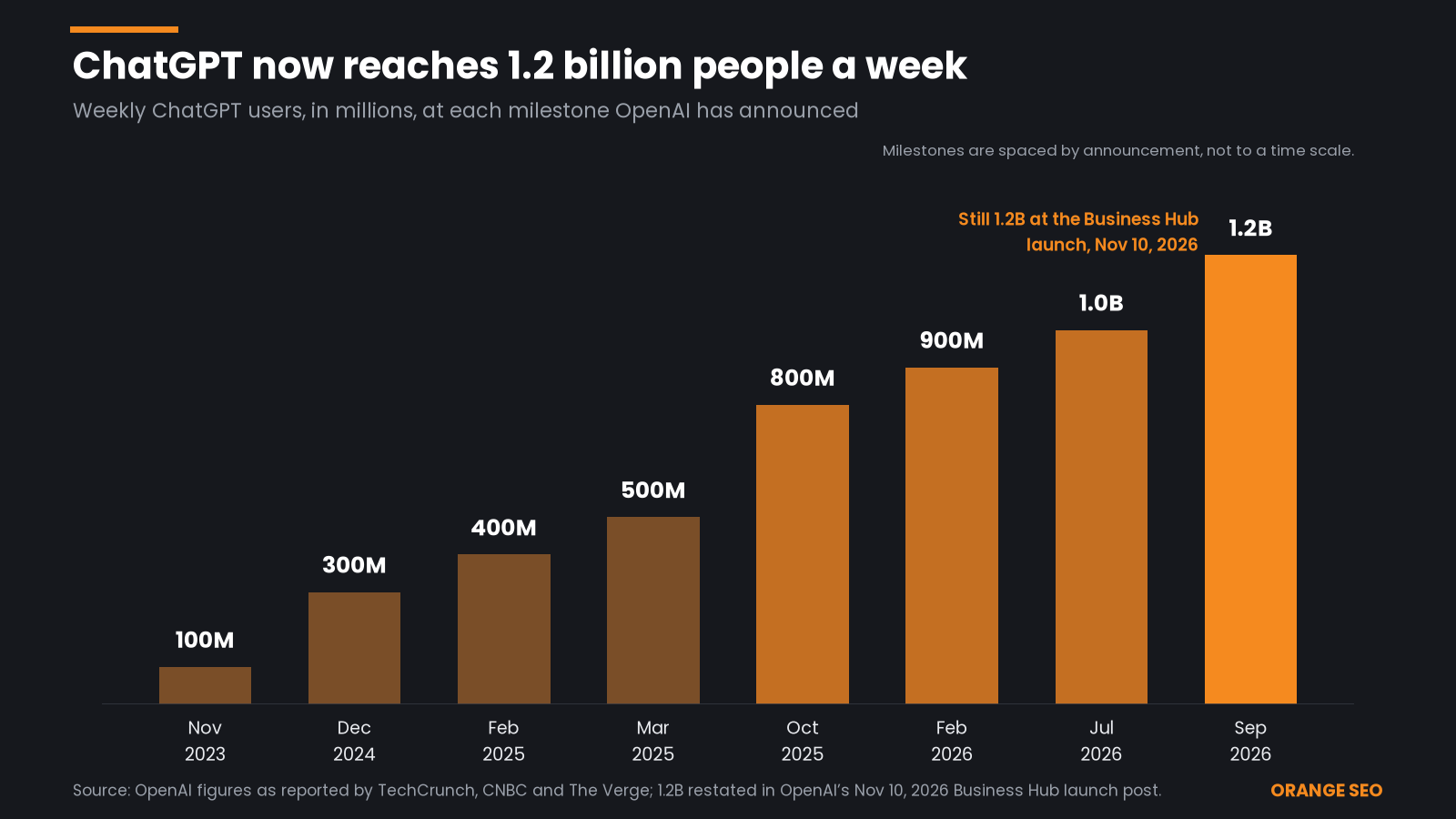
Source: OpenAI, via TechCrunch, CNBC and The Verge
Until now, businesses had no official numbers on how they appeared in those unpaid answers. SEO tool companies could only estimate it by running sample questions through ChatGPT. Business Hub is the first time OpenAI itself reports this data back. Early coverage from Search Engine Land pointed out that it even includes website click counts, something Google's and Microsoft's AI reports don't offer.
Who can use it, and what's limited
Before you start, here's what's open to whom, based on OpenAI's setup guide:
- It's a beta. Features, labels and rules may change.
- Claiming a listing is open to anyone who owns a business or is authorized to represent it, where ChatGPT is available and verification is supported. Availability depends on the business's location and type.
- Local stores and restaurants can currently claim only an existing US listing. Eligible online businesses that can't find a listing may see an option to add one.
- Business Agents are limited to eligible ecommerce and online service businesses in the US with a website, and only in approved industries.
- Some claims are waitlisted. On launch day, at least one business outside the US was placed on a waitlist instead of being approved, PPC Land reported.
- Each brand is managed separately. Central management across a parent company's brands and locations isn't available yet, and claiming the main brand doesn't claim its locations.
Good to know: Claiming your business doesn't guarantee that ChatGPT will recommend you more often. OpenAI is clear that claiming lets you manage the information you provide, and that advertising doesn't influence ChatGPT's independent answers.
ChatGPT Business Hub setup: step by step
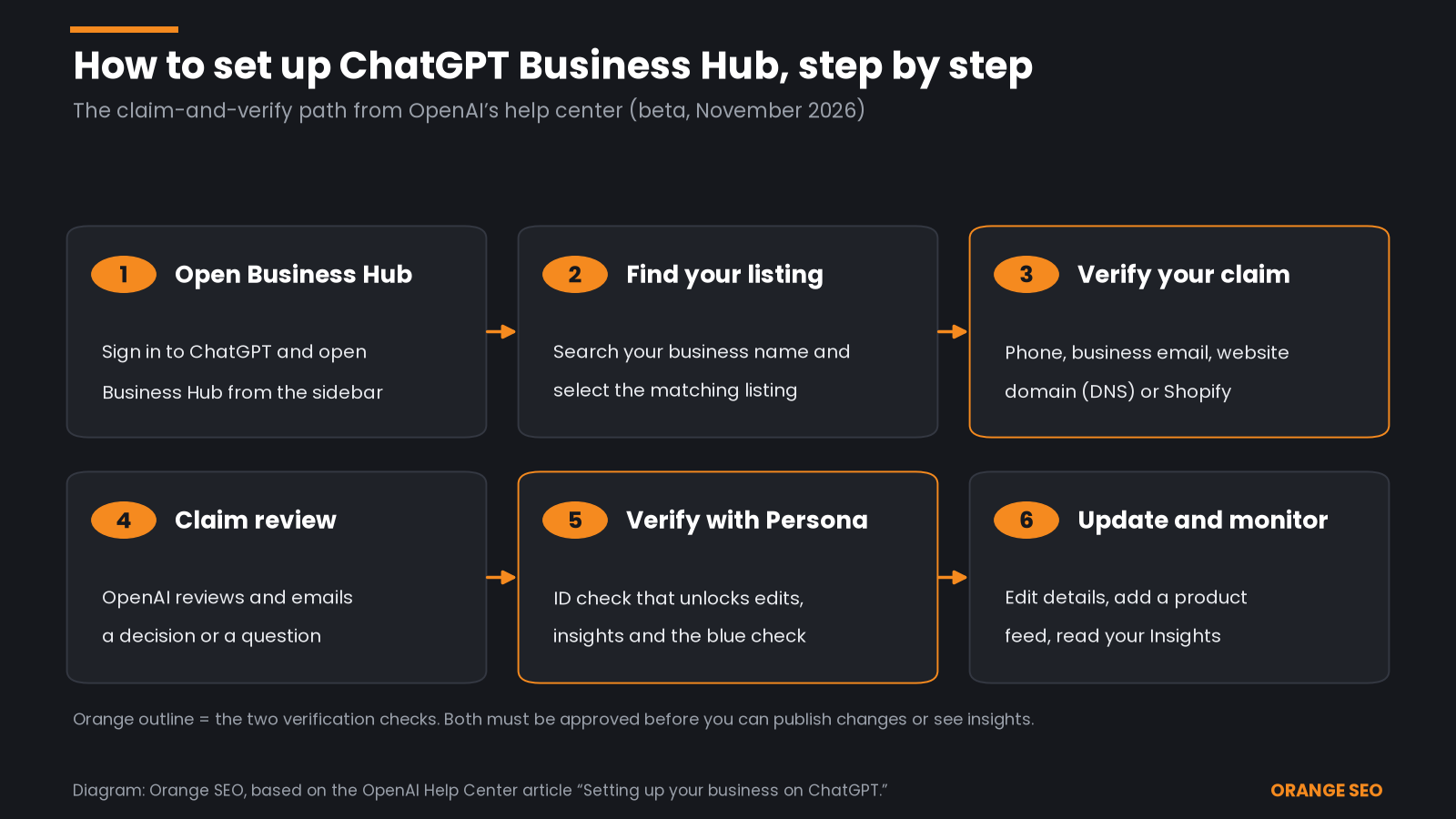
Diagram: Orange SEO, based on OpenAI Help Center
Step 1: Open Business Hub
Sign in to ChatGPT with the account you want to use to manage the business, then open Business Hub from the sidebar. Use an account your business controls long-term, not a personal account that might leave with an employee.
Step 2: Find and select your listing
Search for your business by name and select the listing that matches. In early walkthroughs, the results showed existing entries with street addresses, so check the address carefully if your business name is common. Confirm the ChatGPT account you'll use to manage it.
A few situations you may run into:
- You got a claim invitation by email: open the personal link and sign in with the email address that received it.
- You see "Contact support": the listing is locked. Select it to request help.
- You can't find your business: eligible online businesses may see an option to add it.
Step 3: Verify your claim
Next, prove you're connected to the business. You'll only see the methods offered for your type of business:
- Business phone: choose a text message (SMS) or an automated call, select Get code, then enter the code sent to the number shown.
- Business email: select Get code and enter the code sent to the email address associated with your business.
- Website domain: add the TXT record ChatGPT shows you to your domain's DNS settings, then return and select Verify domain. DNS (Domain Name System) settings are the behind-the-scenes records that point your web address to your website, usually managed wherever you bought your domain.
- Shopify store: select Connect Shopify, review the permissions, log in to your store and follow the prompts.
If someone else manages your domain, such as a web developer or IT company, ask them to add the TXT record. Copy the type, host and value exactly. DNS changes can take a while to show up.
Step 4: Wait for the claim review
OpenAI reviews each claim and emails you its decision or a request for more information. Review time varies. You can cancel the claim while it's under review if you need to.
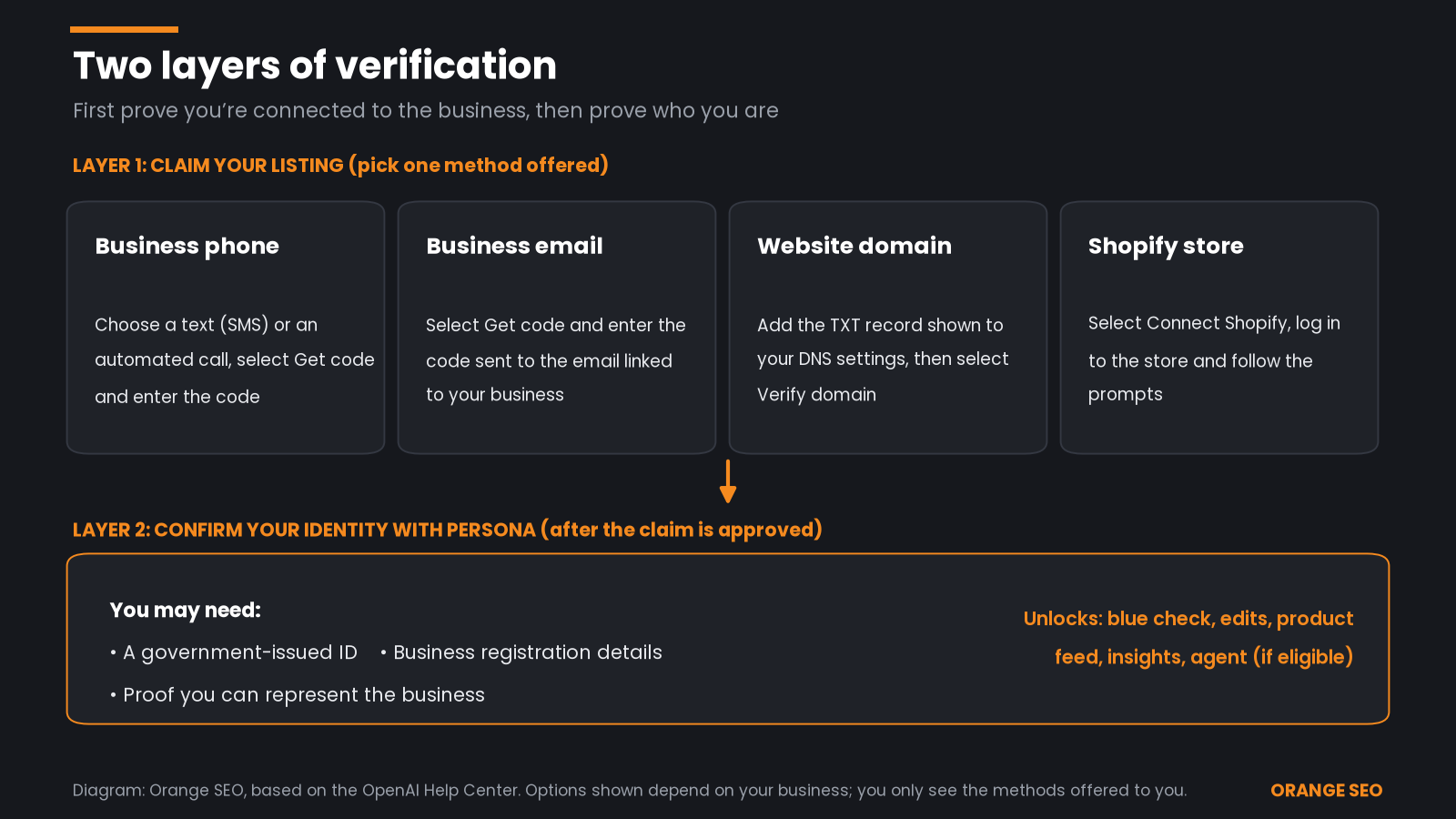
Diagram: Orange SEO, based on OpenAI Help Center
Step 5: Complete identity verification with Persona
This is the step many businesses miss. An approved claim gets you into Business Hub, but you can't publish changes, connect a product feed, view insights or create an agent until you also pass identity verification with Persona, a third-party ID-checking service OpenAI uses.
Select Verify with Persona, then Continue to Persona, and follow the instructions. You may need:
- A government-issued ID
- Business registration information
- Proof that you're authorized to represent the business
Make sure the business name, address and any registration or tax number match your official records exactly; OpenAI's help center specifically asks for this. If you used another method first, you can finish Persona later from your business overview by selecting Verify next to Complete verification with Persona.
One heads-up: if you're using Persona to add a brand-new profile, OpenAI's approval publishes that profile automatically. There's no separate publish step, so have your details ready before you submit.
The blue check: Claiming alone doesn't give your profile a verified badge. The blue check appears only after your Persona verification is approved.

Gather your ID and business registration details before you start Persona verification.
Step 6: Update your details and add products
Once both checks are approved, open your profile to update your website, business description, product or service category, logo, delivery policy and return policy. You can also add a cover photo and other optional details.
If you sell products, you can connect a product feed (a structured file listing your products, prices and stock) by uploading a CSV file, linking a hosted feed or connecting Shopify. OpenAI reviews changes before publishing them, so updates can take time to appear, and ChatGPT may still use other sources when it answers questions about you.
Working with an agency? The admin who claimed the business can add teammates in Business Hub and grant an agency access. Each person should use their own ChatGPT account. Don't forward your personal claim invitation.
The insights inside Business Hub
After your claim and Persona verification are approved, open your business in Business Hub and select Insights. The numbers cover aggregate activity over the past 28 days.
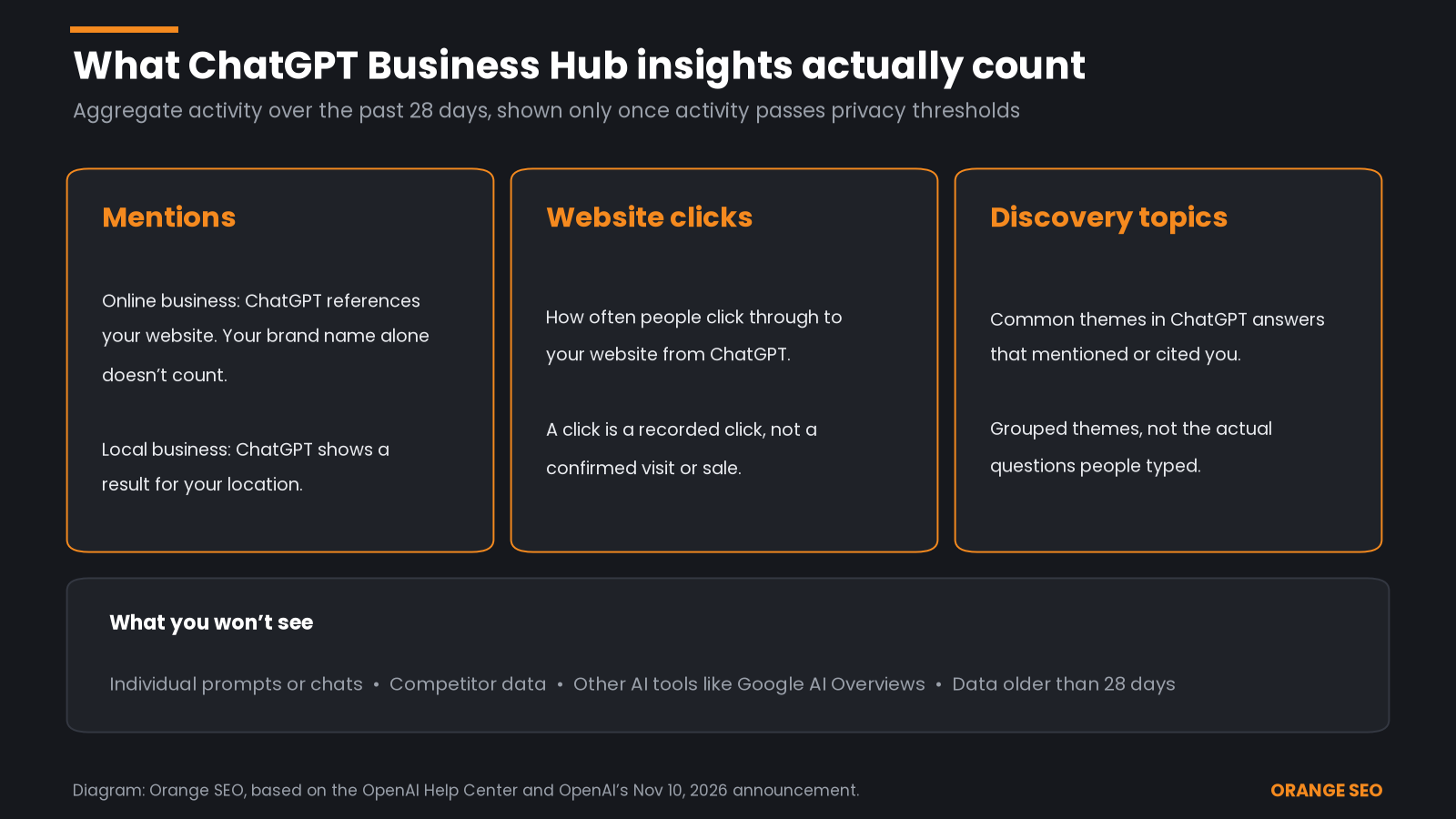
Diagram: Orange SEO, based on OpenAI Help Center
Mentions
For an online business, a mention counts when ChatGPT references your website. Your brand name appearing on its own doesn't count. For a local business, a mention counts when ChatGPT shows a result for that location, even if the person never opens the listing. That makes mentions a floor, not a full count of how often you come up.
Website clicks
This shows how often people click through to your website from ChatGPT. Treat it as recorded clicks, not confirmed visits or sales. Compare it with ChatGPT referral traffic in Google Analytics, and remember that some AI-driven visits get lumped into other channels.
Discovery topics
Discovery topics group the common themes in ChatGPT answers that mentioned or cited your business. Think "affordable kids activities," not the exact question someone typed. They are general categories, not individual prompts, and they don't directly measure what customers wanted.
Early reports also showed a profile views count and a seven-day view, but OpenAI's help article doesn't list them and not every account showed them.
What early numbers look like
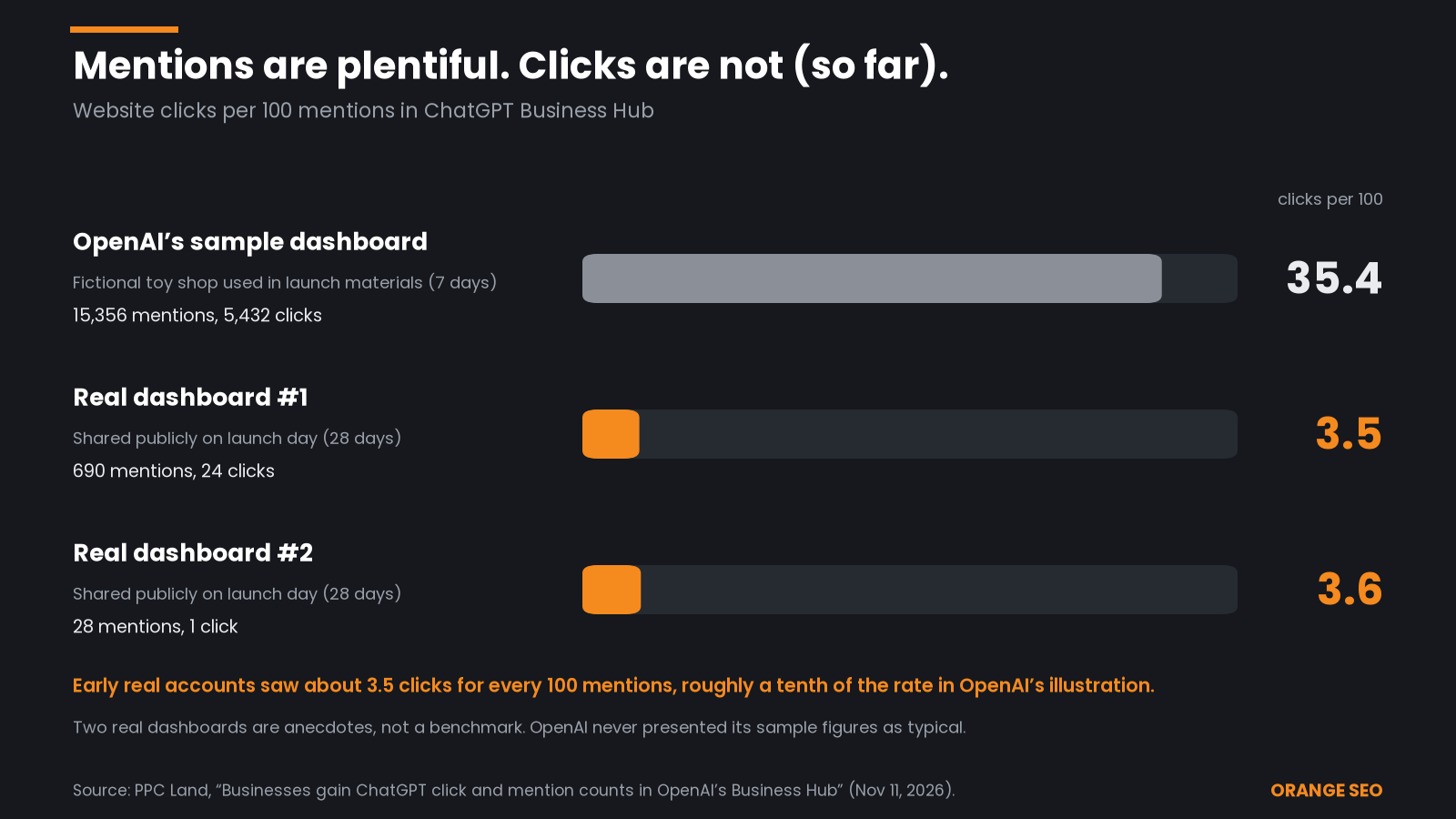
OpenAI's launch materials used a made-up toy shop as an example dashboard. The first real dashboards that business owners shared publicly looked very different.
Source: PPC Land
Two dashboards aren't a benchmark, but the gap is a useful reality check: being mentioned is not the same as being chosen.
What you won't see
Business Hub won't show you:
- The actual questions people asked, or their conversations, including chats with your Business Agent
- How your competitors are doing
- Activity on other AI tools, such as Google's AI Overviews, Perplexity or Gemini
- Anything below OpenAI's privacy thresholds. A blank metric doesn't necessarily mean zero activity. It can mean you haven't reached the reporting threshold yet, or data is still being collected.
What about Business Agents?
A Business Agent is a chat assistant for your business inside ChatGPT. People who open your profile can chat with it about your products and policies, in a clearly labeled chat separate from ChatGPT's own answers.
For now, agents can explain products and policies and link to your website, but they can't complete purchases, take bookings or check orders. They're limited to eligible ecommerce and online service businesses in the US. Businesses can also sponsor their agent as the destination for ChatGPT Ads, a paid option that's separate and clearly labeled.
How to get more out of ChatGPT Business Hub
Claiming is the easy part. Here's how to make it count:
- Claim and verify now. It puts your profile in your hands. If someone else already claimed it, use Dispute ownership in the profile's ••• menu.
- Make your details match everywhere. Your name, address, phone, hours and category should match your website, Google Business Profile and directory listings. Our local citation packages help clean this up.
- Give ChatGPT pages worth citing. Since online-business mentions only count when ChatGPT references your website, clear service, product and FAQ pages matter. That's the heart of AI SEO and GEO (generative engine optimization).
- Earn mentions on trusted sites. ChatGPT also draws on other sources when it describes you. Our AI citation outreach and guide to becoming a source for AI answers explain how.
- Log your numbers monthly. Business Hub shows only the last 28 days, so record mentions, clicks and topics yourself to spot trends over time.
Frequently asked questions
Is ChatGPT Business Hub free?
OpenAI's pages list no fee to claim a business, and you don't need an ads account or an Enterprise agreement. Sponsoring a Business Agent through ChatGPT Ads is a separate, paid option.
How do I verify my business on ChatGPT?
First, claim your listing using a method offered for your business: a code by text or call to your business phone, a code to your business email, a DNS TXT record on your website domain or a Shopify connection. After OpenAI approves the claim, complete identity verification with Persona.
How long does ChatGPT business verification take?
OpenAI says review time varies. It emails you a decision or a request for more information after reviewing both the claim and the Persona check. DNS changes for domain verification can also take time to appear.
Why are my Business Hub insights blank?
Insights only appear once activity passes OpenAI's privacy thresholds, and data may still be collecting. A blank metric doesn't necessarily mean zero activity. If it stays blank, contact OpenAI Support.
Will claiming my business make ChatGPT recommend it more?
Not by itself. OpenAI says claiming doesn't guarantee more visibility or give you control over ChatGPT's independent recommendations. Accurate details help, but strong website content and outside citations still do the heavy lifting.
Can my marketing agency manage Business Hub for me?
Yes. The admin who claimed the business can add teammates and grant an agency access, with each person using their own ChatGPT account.
Want help getting found in ChatGPT?
Business Hub shows you how ChatGPT sees your business. Turning mentions into customers takes the right pages, consistent listings and trusted citations. Contact Orange SEO and we'll help you claim your listing, read your insights and build a plan to show up more often in AI answers.
Sources
- OpenAI, "Introducing Businesses in ChatGPT" (Nov 10, 2026): https://openai.com/index/introducing-businesses-chatgpt/
- OpenAI Help Center, "Setting up your business on ChatGPT": https://help.openai.com/en/articles/20001635-setting-up-your-business-on-chatgpt
- Search Engine Land, "ChatGPT Business Hub is now live" (Nov 10, 2026): https://searchengineland.com/chatgpt-business-hub-is-now-live-501350
- PPC Land, "Businesses gain ChatGPT click and mention counts in OpenAI's Business Hub" (Nov 11, 2026): https://ppc.land/businesses-gain-chatgpt-click-and-mention-counts-in-openais-business-hub/
- TechCrunch, "OpenAI rolls out new business profiles, making ChatGPT just a little bit more like Google" (Nov 10, 2026): https://techcrunch.com/2026/11/10/openai-rolls-out-new-business-profiles-making-chatgpt-just-a-little-bit-more-like-google/
- The Verge, "ChatGPT is getting verified AI 'Business Agents'" (Nov 10, 2026): https://www.theverge.com/ai-artificial-intelligence/1030552/openai-chatgpt-business-agents-hub
- TechCrunch, "OpenAI's ChatGPT now has 100 million weekly active users" (Nov 6, 2023): https://techcrunch.com/2023/11/06/openais-chatgpt-now-has-100-million-weekly-active-users/
- CNBC, "OpenAI's active user count soars to 300 million people per week" (Dec 4, 2024): https://www.cnbc.com/2024/12/04/openais-active-user-count-soars-to-300-million-people-per-week.html
- CNBC, "OpenAI tops 400 million users despite DeepSeek's emergence" (Feb 20, 2025): https://www.cnbc.com/2025/02/20/openai-tops-400-million-users-despite-deepseeks-emergence.html
- TechCrunch, report on ChatGPT reaching 800M weekly active users (Oct 6, 2025): https://techcrunch.com/2025/10/06/sam-altman-says-chatgpt-has-hit-800m-weekly-active-users/
- TechCrunch, "ChatGPT reaches 900M weekly active users" (Feb 27, 2026): https://techcrunch.com/2026/02/27/chatgpt-reaches-900m-weekly-active-users/
- The Verge, "ChatGPT and Gemini both just passed 1 billion users" (2026): https://www.theverge.com/ai-artificial-intelligence/978113/chatgpt-gemini-1-billion-users
- The Verge, "ChatGPT now has 1.2 billion weekly users, OpenAI says" (Sep 29, 2026): https://www.theverge.com/ai-artificial-intelligence/1002265/chatgpt-now-has-1-2-billion-weekly-users-openai-says